코인 ohlcv 데이터를 크롤링해보자. 거래소는 Ascendex 이고, 공식문서는 다음과 같다.
ASCENDEX 공식 문서
https://ascendex.github.io/ascendex-pro-api/#ascendex-pro-api-documentation
API Reference
ascendex.github.io
1. API Key 발급
인증키 발급은 홈페이지에서 로그인 후 가능하므로, 간략하게 설명하고 넘어간다.
https://ascendex.com/en/global-digital-asset-platform
AscendEX: Cryptocurrency Trading Platform | Bitcoin & Crypto Exchange
SUBSCRIBE to our Sunday Briefing Weekly News Digest for Crypto Update the latest virtual currency global news every week, defining crypto, digital assets and the future of finance.
ascendex.com
인증키 발급 경로
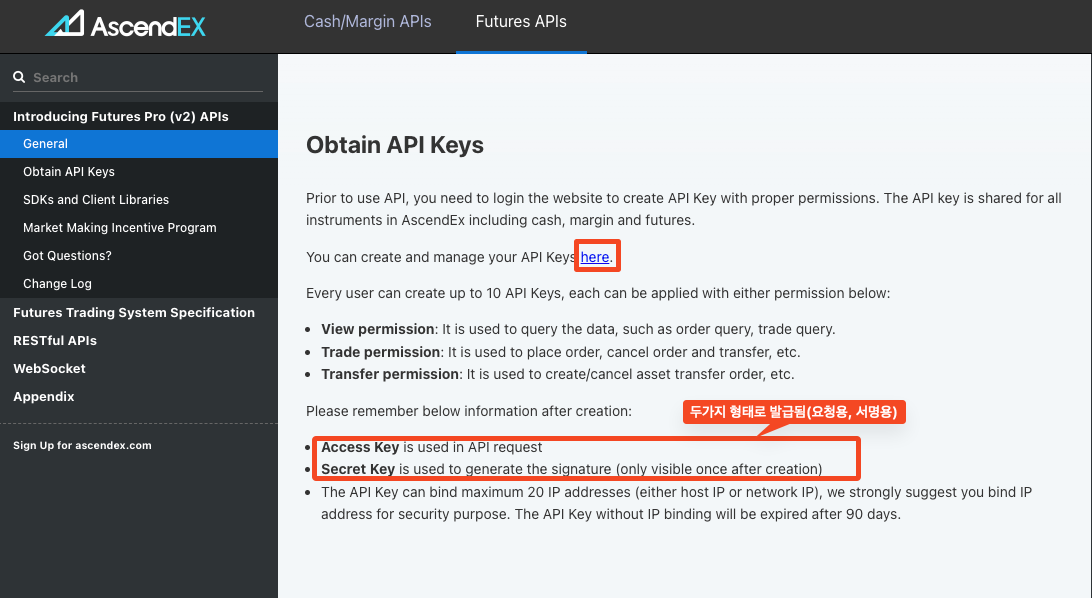
인증키는 두가지 형태로 발급된다
2. 코드 샘플(노션) 확인하기
공식문서에는 각각 카테고리마다 code Sample이 있다. 해당경로로 이동한다.(https://github.com/ascendex/ascendex-pro-api-demo)

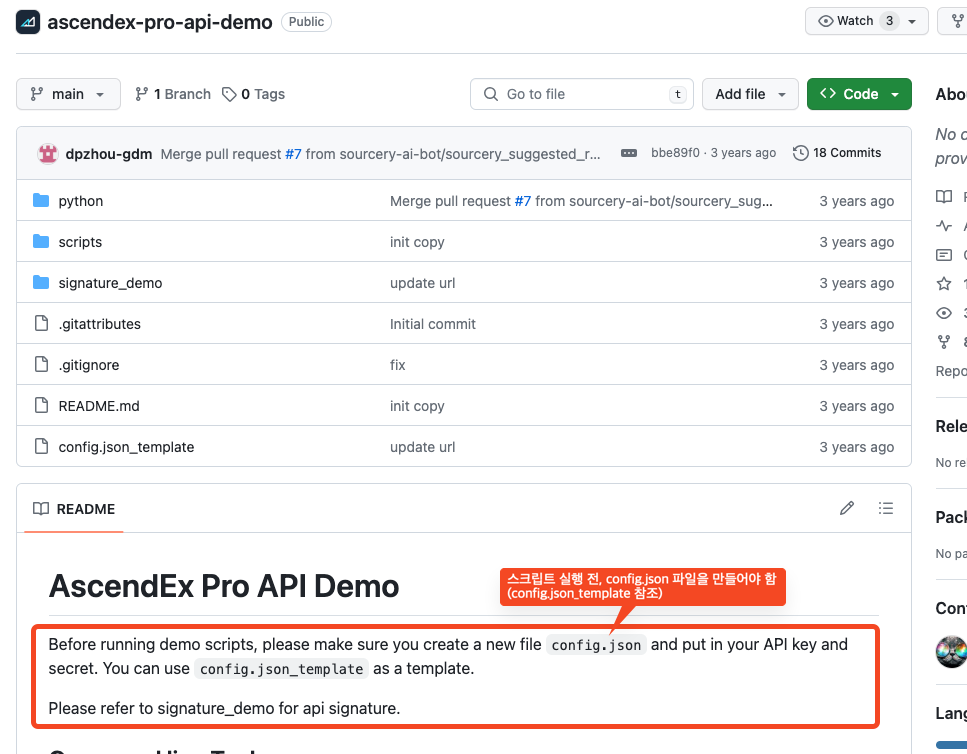
리드미를 읽어보면, 스크립트를 실행하기 전에 config.json 파일을 만들어야 한다고 적혀있다. (인증용)
참고할 개별 파일을 참고하기 조금 귀찮으니 전체를 git clone에서 로컬환경에 다운받아준다.
3. 로컬 환경에서 config.json 편집
config.json_template 파일을 열고, 아래와 같은 코드를 수정해준다음 config.json 파일로 이름을 변경해준다.
{
  "ascendex": {
    "https": "https://ascendex.com",
    "wss": "wss://ascendex.com:443",
    "group": 0,
    "apikey": "<your-api-key>",
    "secret": "<your-api-secret>"
  }
}
이제 이 파일을 가지고 인증하고 서명을 하게 된다. 매수/매도를 주문하기도 가능하다.
ohlcv 데이터를 가져오는게 목적이므로, 바로 query_pub_barhist.py 파일에 들어간다.
4. query_pub_barhist.py 파일 접근
import os
import click
import requests
from pprint import pprint

# Local imports
from util import *


@click.command()
@click.option("--symbol", type=str, default="BTC/USDT")
@click.option("--interval", type=str, default="1")
@click.option("--frm", type=int)
@click.option("--to", type=int)
@click.option("--n", type=int, default=10)
@click.option("--config", type=str, default="config.json")
def run(symbol, interval, frm, to, n, config):
    if config is None:
        config = os.path.join(os.path.dirname(os.path.abspath(__file__)), "..", "config.json")
        print(f"Config file is not specified, use {config}")
    ascdexCfg = load_config(config)['ascendex']

    host = ascdexCfg['https']

    url = f"{host}/{ROUTE_PREFIX}/barhist"
    params = {
        "symbol":   symbol,
        "interval": interval,
        "n":        n,
        "from":     frm,
        "to":       to,
    }

    print(url)
    res = requests.get(url, params = params)
    pprint(parse_response(res))


if __name__ == "__main__":
    run()
위 코드를 수정하여, 원하는 결과를 추출하면 된다. (defaultt = '' 에 원하는 값 입력)
import os
import click
import requests
import csv
from util import *

@click.command()
@click.option("--symbol", type=str, default="BTC/USDT") # 비트코인/단위
@click.option("--interval", type=str, default="60") # 분단위
@click.option("--n", type=int, default=120) # 행 개수
@click.option("--config", type=str, default="config.json") # 인증
@click.option("--output", type=str, default="output.csv") # 추출할 csv 이름
def run(symbol, interval, n, config, output):
    if config is None:
        config = os.path.join(os.path.dirname(os.path.abspath(__file__)), "..", "config.json")
        print(f"Config file is not specified, use {config}")
    ascdexCfg = load_config(config)['ascendex']

    host = ascdexCfg['https']

    # 타임스탬프 설정
    start_timestamp = 1706400000000
    end_timestamp = 1706659200000

    url = f"{host}/{ROUTE_PREFIX}/barhist"
    params = {
        "symbol":   symbol,
        "interval": interval,
        "n":        n,
        "from":     start_timestamp,
        "to":       end_timestamp,
    }

    print(url)
    res = requests.get(url, params=params)
    data = parse_response(res)

    # CSV 파일로 저장
    with open(output, 'w', newline='') as csvfile:
        fieldnames = ['Timestamp', 'Open', 'High', 'Low', 'Close', 'Volume']
        writer = csv.DictWriter(csvfile, fieldnames=fieldnames)

        writer.writeheader()
        for item in data['data']:
            writer.writerow({
                'Timestamp': item['data']['ts'],
                'Open': item['data']['o'],
                'High': item['data']['h'],
                'Low': item['data']['l'],
                'Close': item['data']['c'],
                'Volume': item['data']['v']
            })

    print(f"Data saved to {output}")

if __name__ == "__main__":
    run()
데이터프레임 형태로 뽑고 싶어서, 추출한 결과를 csv파일을 열어서 변환해서 넣는 방식으로 코드를 변경했다.
코드를 실행하면, 2024년 01월 28일부터 2024년 01월 31일까지의 BTC OHLCV 데이터가 output.csv에 저장된다.
'Web > Crawling' 카테고리의 다른 글
| [Web] API 크롤링 - 서울 열린데이터광장 유동인구 API 크롤링 (0) | 2023.08.13 |
|---|---|
| [Web] 국가별 인구 데이터 크롤링 with Scrapy - 1 (1) | 2023.08.09 |
| [Web] 웹 크롤링, 스크래핑 BeautifulSoup - 음원 차트 출력 (0) | 2023.08.08 |
| [Web] 웹 크롤링,스크래핑 Basic - 3. User-Agent (0) | 2023.08.08 |
| [Web] 웹 크롤링 , 스크래핑 Basic - 2. re , 정규표현식 (0) | 2023.08.06 |


